2022年10月24日 星期一

[EBS]Query to find Form Function attached to which Responsibility

https://www.funoracleapps.com/2020/03/query-to-find-form-function-attached-to.html 


SELECT DISTINCT faa.application_name application, rtl.responsibility_name,

ffl.user_function_name, ff.function_name, ffl.description,

ff.TYPE,rtl.language

FROM fnd_compiled_menu_functions cmf,

fnd_form_functions ff,

fnd_form_functions_tl ffl,

fnd_responsibility r,

fnd_responsibility_tl rtl,

apps.fnd_application_all_view faa

WHERE cmf.function_id = ff.function_id

AND r.menu_id = cmf.menu_id

AND rtl.responsibility_id = r.responsibility_id

AND cmf.grant_flag = 'Y'

AND ff.function_id = ffl.function_id

AND faa.application_id(+) = r.application_id

AND UPPER(rtl.responsibility_name) LIKE '%Responsibility_Name%'

--and ffl.user_function_name like '%&Function_Name%'

AND r.end_date IS NULL

AND rtl.language='US'

ORDER BY rtl.responsibility_name;

2022年10月19日 星期三

Oracle APEX EXPORT & IMPORT Application


https://docs.oracle.com/en/database/oracle/apex/22.1/aeadm/exporting-and-importing-using-sqlcl.html

EXPORT Application

Step1. Download SQLcl

https://www.oracle.com/database/sqldeveloper/technologies/sqlcl/download/ 


Step2. (Windows)透過提示命令字元或PowerShell連至DB

切換至SQLcl目錄, 例如: D:\Tools\sqlcl-latest\sqlcl\bin

執行: sql.exe ${username}/${password}@//${00.00.00.000:1521}/${DatabaseName}


Step3. Export Application

執行: apex export -applicationid ${appid} -dir ${path}

例如: apex export -applicationid 224 -dir D:/apex_backup

產生 f224.sql 於目錄 D:/apex_backup


Import Application

於SQLcl執行export的sql file

例如: @D:/apex_backup/f224.sql

2022年9月21日 星期三

ORA-04021:timeout occurred while waiting to lock object

1. 先查詢是否被Lock 

SELECT

b.SID,

b.USERNAME,

b.MACHINE,

b.SERIAL#

FROM

V$ACCESS a,

V$SESSION b

WHERE

a.SID = b.SID

AND a.OBJECT = '%PACKAGE_NAME%'

AND a.TYPE = 'PACKAGE';


2. 若是被Lock, 砍掉該筆session

alter system kill session 'sid,serial#'

2022年9月19日 星期一

[EBS]取得responsibility

 Useful query to get user id, responsibility id and application id in EBS.

To know about User Id use below Query:-


SQL> select user_id from fnd_user where user_name=’DOYEN’;


To know about Responsibility id use below Query:-


SQL> select responsibility_id,RESPONSIBILITY_NAME from fnd_responsibility_vl where responsibility_name like ‘%India%Local%Payables%’;


To Know about Application id use below Query:-

https://doyensys.com/blogs/useful-query-to-get-user-id-responsibility-id-and-application-id-in-ebs/


SQL>select APPLICATION_ID from fnd_responsibility_vl where responsibility_id=50366;


To Know about Org id from po:-


SQL>select org_id from po_headers_all where segment1=’&PO’;


To know about Requisition Org id from requisition number:-


$SQL>select hr.name, prh.segment1, prh.org_id from po_requisition_headers_all prh, hr_all_organization_units hr where prh.org_id = hr.organization_id and prh.segment1 = ‘&Enter_Req_Number’;

2022年8月29日 星期一

[EBS] 查看Concurrent

 SELECT DISTINCT

       fa.APPLICATION_SHORT_NAME, --application(模組)

       fat.APPLICATION_NAME,

       fcp.CONCURRENT_PROGRAM_NAME, --program(應用程式)

       fcpt.USER_CONCURRENT_PROGRAM_NAME,

       fcpT.DESCRIPTION,

       fcpt.LANGUAGE

  FROM apps.fnd_application_tl fat,

       apps.fnd_application fa,

       apps.fnd_concurrent_programs_tl fcpt,

       apps.fnd_concurrent_programs fcp,

       apps.fnd_executables fe

WHERE fat.APPLICATION_ID = fa.APPLICATION_ID

       AND fat.LANGUAGE = fcpt.LANGUAGE

       AND fa.APPLICATION_ID = fcp.APPLICATION_ID

       AND fcpt.CONCURRENT_PROGRAM_ID = fcp.CONCURRENT_PROGRAM_ID

       AND fcp.executable_id = fe.executable_id

       AND fcpt.USER_CONCURRENT_PROGRAM_NAME='HUB flow concurrent'; 

       --報表名稱


SELECT

   distinct user_concurrent_program_name,

    responsibility_name,

    request_date,

    argument_text,

    request_id,

    phase_code,

    status_code,

    logfile_name,

    outfile_name,

    output_file_type,

    hold_flag,

    user_name

FROM

    apps.fnd_concurrent_requests fcr,

    apps.fnd_concurrent_programs_tl fcp,

    apps.fnd_responsibility_tl fr,

    apps.fnd_user fu

WHERE

    fcr.CONCURRENT_PROGRAM_ID = fcp.concurrent_program_id

    and fcr.responsibility_id = fr.responsibility_id

    and fcr.requested_by = fu.user_id

    --and user_name = upper('HIMSINGH')

    and user_concurrent_program_name in ('deliverry flow concurrent')

    --and Phase_code='P'

ORDER BY REQUEST_DATE DESC;


--查看request執行狀況

SELECT   /*+ rule */

         rq.parent_request_id,

         rq.request_id,

         tl.user_concurrent_program_name,

         rq.actual_start_date,

         rq.actual_completion_date,

         ROUND((rq.actual_completion_date - rq.actual_start_date) * 1440, 2) run_time_min

FROM     apps.fnd_concurrent_programs_vl tl,

         apps.fnd_concurrent_requests rq

WHERE    tl.application_id = rq.program_application_id

AND      tl.concurrent_program_id = rq.concurrent_program_id

AND      rq.actual_start_date IS NOT NULL

AND      rq.actual_completion_date IS NOT NULL

AND      tl.user_concurrent_program_name = 'employee master data'

ORDER BY rq.actual_completion_date DESC;

2022年8月18日 星期四

[EBS]彈性欄位設定

1. 查看要設定的畫面Title是什麼, 請參考另一篇: [EBS]查詢某個畫面的彈性欄位

2.切換權限Application Developer", Flexfield > Descriptive > Register

按[Segments] > [New], 編輯相關欄位

退出時,check [Freeze Fexfild definitions],並[Compile]


[EBS]查詢某個畫面的彈性欄位

 1. Situation: 想查詢訂單明細的彈性欄位:SKU ID


2. 先找出這隻程式相關資訊: 
比如說,這畫面上可以看到是Additional Line Attribute Information
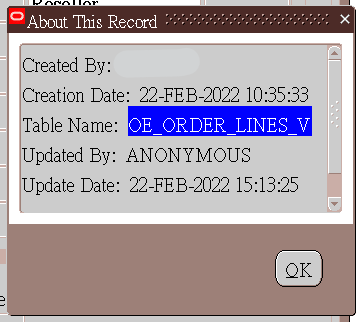
或是Help > Record History 查看一下Table, 通常會跟這個名字類似...
或是Help > Diagnostics > Examine 查看(Block輸入$DESCRIPTIVE_FLEXFIELD$, Field輸入要查的項目, 按Tab查詢出Value)


3.  切換權限到Application Developer", Flexfield > Descriptive > Register
F11查詢, 例如輸入Table Name=OE_ORDER_LINES%, Ctrl+F11執行查詢.
再比對一下Title.

4. 記下Ttile再到 Flexfield > Descriptive > Segments  查詢欄位
找到SKU_ID是使用OE_ORDER_LINES_ALL.Attribute7